搜尋

【Flywoo】GOKU F405 HD V2 12A ELRS AIO 飛控電調|1–2S・O4 隨插即用|銀角低利率分期

銀角低利率分期可申請 6/12/18/24 期。下單前請先傳訊息至酷飛官方 LINE(@729jvyax)確認有無現貨,避免等候過久。本賣場不提供免運;可使用 7-ELEVEN/全家店到店,請提供門市資料;黑貓宅急便請先洽官方 LINE 確認配送與運費。 【Flywoo】GOKU F405 HD V2 12A ELRS AIO 飛控電調|1–2S・O4 隨插即用 這是 Flywoo 的飛控與電子零組件,商品名稱、型號與可確認規格如下。為避免把不同年份或不同版本的參數混用,本頁文字僅整理目前商品標題、選項與既有資料中可核對的資訊;詳細尺寸、接線及安裝示意請一併參閱下方原有說明。 商品重點 商品識別:【Flywoo】GOKU F405 HD V2 12A ELRS AIO 飛控電調|1–2S・O
是否送貨
$ 2,876
decrease increase

低利率分期與下單前確認

想降低一次付清的壓力,可選擇銀角低利率分期 6/12/18/24 期;實際申請資格、利率、總費用與核准結果以銀角平台審核及訂單顯示為準。

  • 下單前請先傳訊息至酷飛官方 LINE(ID:@729jvyax)確認有無現貨,確認後再下單,可避免預購或調貨等待時間過長。
  • 本賣場不提供免運服務,運費依配送方式另計。
  • 可使用 7-ELEVEN 或全家店到店;請透過官方 LINE 提供超商名稱、門市名稱、店號、收件人姓名與電話。
  • 如需黑貓宅急便,請先透過官方 LINE 確認配送方式與運費後再下單。

加入酷飛官方 LINE|@729jvyax

【Flywoo】GOKU F405 HD V2 12A ELRS AIO 飛控電調|1–2S・O4 隨插即用

這是 Flywoo 的飛控與電子零組件,商品名稱、型號與可確認規格如下。為避免把不同年份或不同版本的參數混用,本頁文字僅整理目前商品標題、選項與既有資料中可核對的資訊;詳細尺寸、接線及安裝示意請一併參閱下方原有說明。

商品重點

  • 商品識別:【Flywoo】GOKU F405 HD V2 12A ELRS AIO 飛控電調|1–2S・O4 隨插即用
  • 品牌:Flywoo
  • 商品類型:飛控/電子零件
  • 可選規格:Built-in ELRS 2.4g (MPU6000)/Built-in ELRS 2.4g (ICM42688)/NO RX(ICM42688)

選購與安裝確認

  • 確認輸入電壓、電流容量、安裝孔距、接頭與韌體目標。
  • 安裝及焊接前請斷電,完成後先檢查短路與極性。
  • 首次上電建議使用限流保護並先拆除槳葉。

包裝與出貨說明

本商品依您選擇的規格出貨;若商品名稱、選項或圖片標示數量,出貨內容以該規格為準。商品圖可能同時展示安裝效果或其他搭配零件,未列於所選規格者不包含。若無法確認版本,請在下單前提供實機型號或照片由我們協助核對。

既有詳細資訊與原廠資料

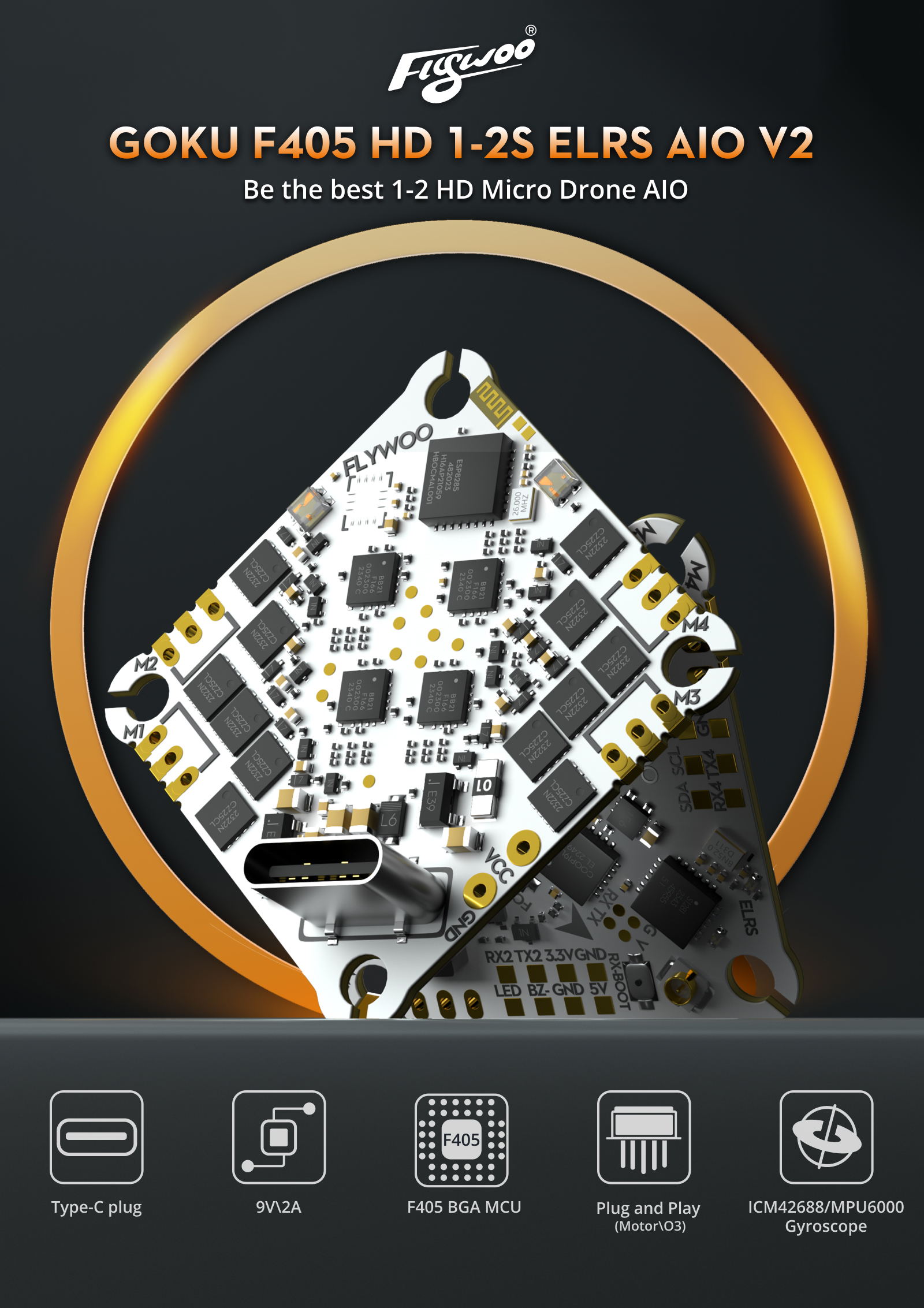
With the growing popularity of digital transmission, FLYWOO introduces an innovative solution for 1-2S HD Micro Drones.

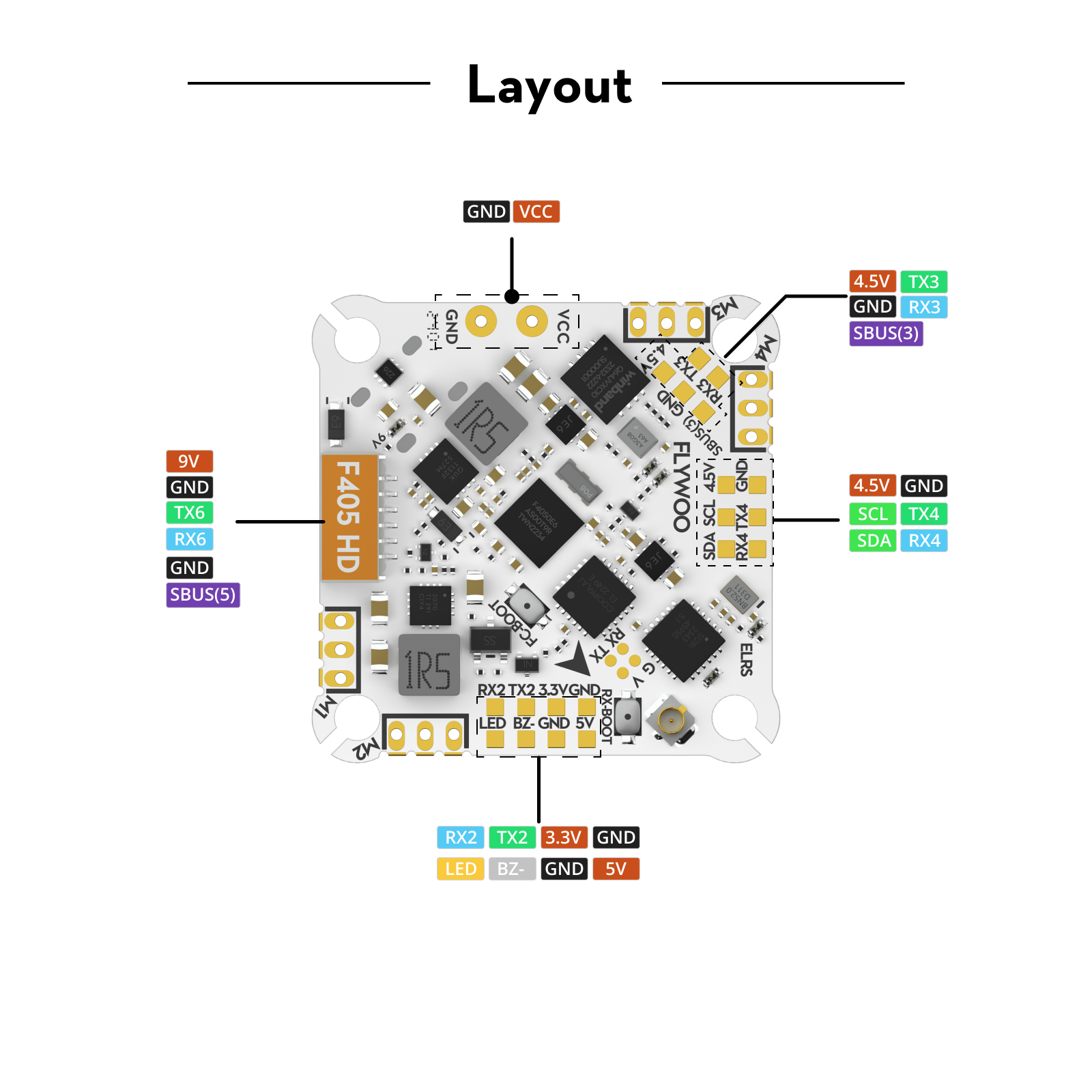
This full-featured HD AIO solution integrates a Type-C interface, equipped with a high-performance F405 BGA MCU, and offers enoug Uart to meet the meet all you need. The GOKU F405 HD V2 AIO features a built-in 9V 2A BEC module, effectively preventing power cuts in the O3 Air unit due to insufficient voltage. 

Additionally, it comes with a serial ELRS 2.4G receiver, an 8MB black box, a barometer, and a current sensor, specifically designed for HD VTX. Its socket-style motor connections and plug-and-play O3 design significantly simpliy the installation and debugging process, achieving a perfect blend of efficiency and convenience.

Highlights:

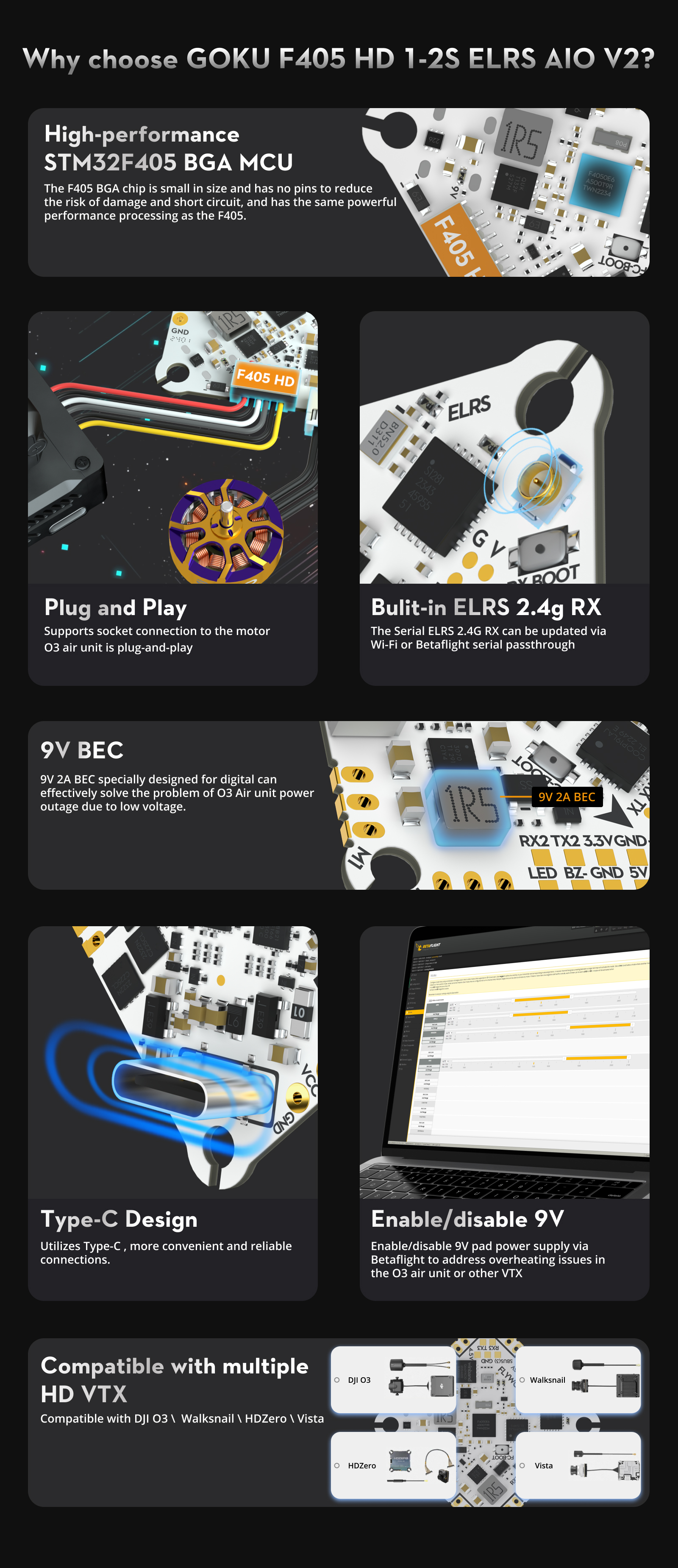
  1. Type-C Design: Utilizes Type-C , more convenient and reliable connections.
  2. New Power Supply : Features 9V 2A BEC , effectively preventing power outages in the O3 Air unit due to voltage dropping .
  3. Plug-and-Play O3 Port: Direct plug design for O3 air unit eliminates complex soldering steps
  4. Motor Socket Design: Adopts socket connections for motors to facilitate quick replacements and upgrades.
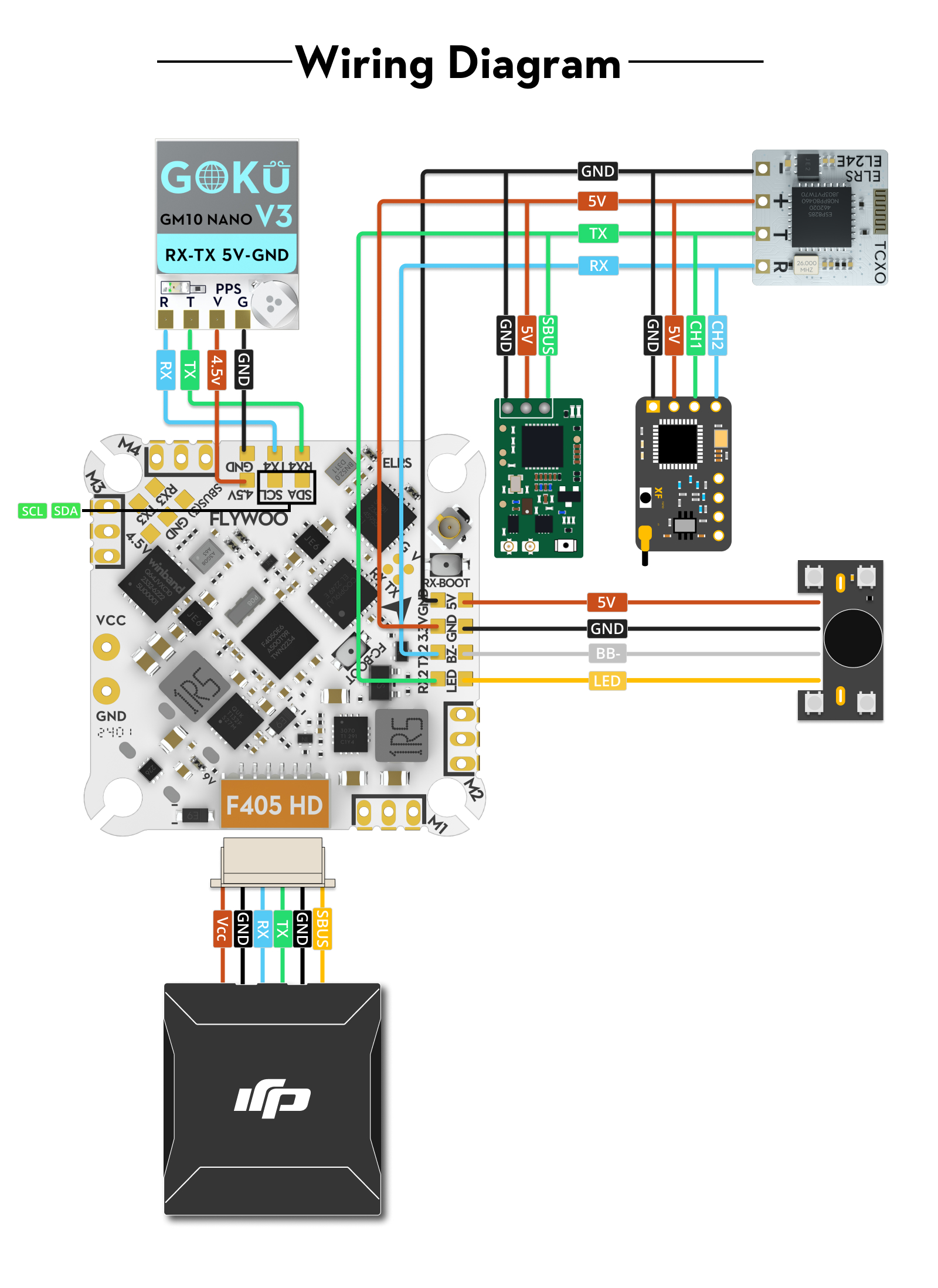
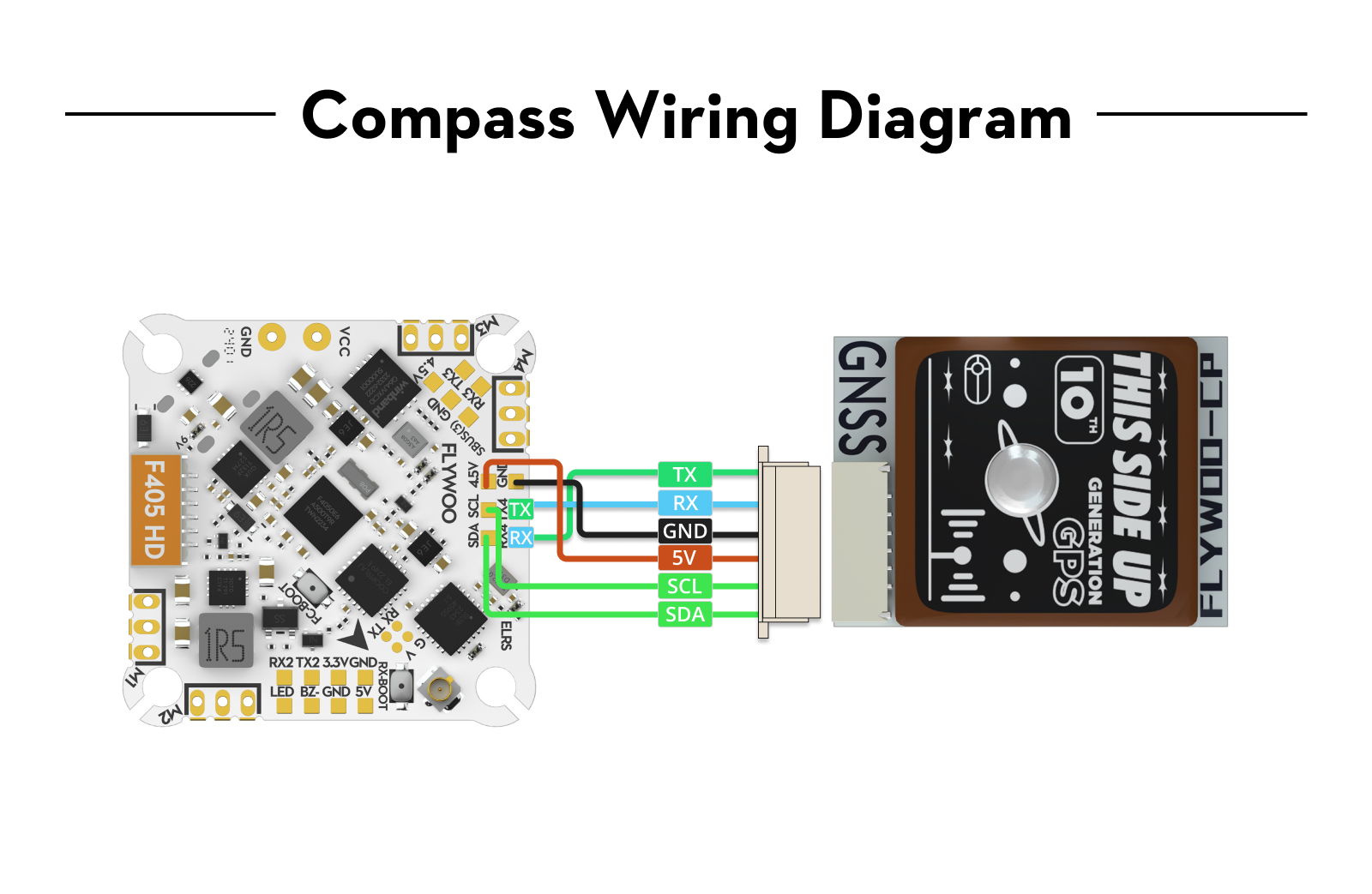
  5. Multifunctional Design: Integrates a serial ELRS 2.4G receiver, 8MB black box, barometer, and current sensor, reserves 2 full UARTs and 1 standard SBUS port, supporting connections with various devices like GPS, HD VTX, and external receivers.
 
GOKU F405 HD 1-2S ELRS AIO V2
GOKU F405 1-2S 12A AIO ELRS
Firmware:
FLYWOOF405S_AIO
FLYWOOF405S_AIO
BEC:
5V 2A/9V 2A
5V 2A
Flash:
8M
8M
LED:
2*WS2812
2*WS2812
Barometer:
DPS310/SPL06
DPS310/SPL06
Gyro:
ICM42688P / MPU6000
ICM42688P / MPU6000
Motor:
M1-M4 OUTPUT I2C: SCL/SDA
Uarts:
1,2,3,4,5,6
1,2,3,4,5,6
connector:
Type-C
Micro
OSD:
NO
AT7456E
Hole:
25.5*25.5-3mm
25.5*25.5-3mm
Size:
30*30mm
30*30mm
Weight:
4.9g
4.1g

Specifications:

  • BF Flight Controller Firmware: FLYWOOF405S_AIO
  • INAV Firmware: FLYWOOF405HD
  • MCU: STM32F405BGA
  • BEC:  5V 2A/9V 2A 
  • Flash:  8M
  • LED: 2*WS2812
  • Barometer:  DPS310/SPL06
  • Gyro:  ICM42688P / MPU6000
  • Motor: M1-M4 OUTPUT I2C: SCL/SDA
  • Uarts: 1,2,3,4,5,6 
  • connector: Type-C 
  • OSD: NO
  • Hole:  25.5*25.5-3mm 
  • Size:  30*30mm 
  • Weight: 4.9g

Onboard 4in1 ESC

  • Built-in 1S/2S 12A BL_S 4in1 ESC
  • Support Oneshot125, Oneshot42, Multishot,
  • Dshot150, Dshot300, Dshot600
  • Input Voltage: 1-2S Lipo
  • Firmware: BLHELI_S
  • Firmware: Z_H_30_REV16.7

ELRS2.4G RX: (optional)

  • ESP8285 MCU
  • SX1280IMLTRT RF Module
  • Frequency Range: 2400 MHz to 2500 MHz
  • Maximum receive refresh rate: 500Hz
  • Minimum receiver refresh rate: 25Hz Seiral:
  • UART 1
  • Firmware: Flywoo EL24P 2400 RX
  • Version: 3.X.X

In the Box

  • 1x XT30 Power Cable
  • 1x Flywoo ELRS 2.4g Minimortal PCB T Antenna UFL(only ELRS Version)
  • 1x DJI O3 Connection Cable
  • 1x PH 2.0 Battery Lead
  • 1x capacitor 
  • 4x JST Straight Socket
  • 4x M2*10 screw
  • 4x M2 nuts
  • 4x M2 shock-absorbing ball

About Betaflight

ESC Firmware

  1. The ESC firmware defaults to Bluejay 0.19.2 48KHz.
  2. supports bidirectional D-shot and RPM filtering in Betaflight
  3. it doesn’t recommend upgrading the 96KHz, or it might cause an error in the motor idle setting, not spinning when disarmed.
  4. DO NOT flash the firmware with a shorter interval, otherwise, there will be a certain chance of stalling and burning the flight controller.
 

Serial ELRS 2.4G RX

  1. receiver protocol Serial ELRS 2.4G RX uses the Crossfire serial protocol (CRSF protocol) to communicate between the receiver and the flight controller board. So the Serial ELRS 2.4G RX is available to support upgrading to ELRS Configurator with no need to flash Betaflight flight controller firmware.
  2. Binding steps     
  • To enter the binding mode, unplug and plug the power/data cable three times;
  • The RX LED will flash rapidly twice, indicating the receiver is in binding mode;
  • Ensure the TX module or wireless transmitter enters binding mode;
  • If the receiver's light stays on constantly, it means it's bound.

      3.Upgrade steps

  • The Serial ELRS 2.4G RX can be updated via Wi-Fi or Betaflight serial passthrough. Here is the way to update the Serial ELRS 2.4G RX firmware through passthrough.
  • Insert the FC into the computer, but do not connect to the Betaflight configurator.
  • Select the target "FLYWOO 2.4Ghz EL24P"
  • Use the BetaflightPassthrough option in the ExpressLRS configurator for the upgrade
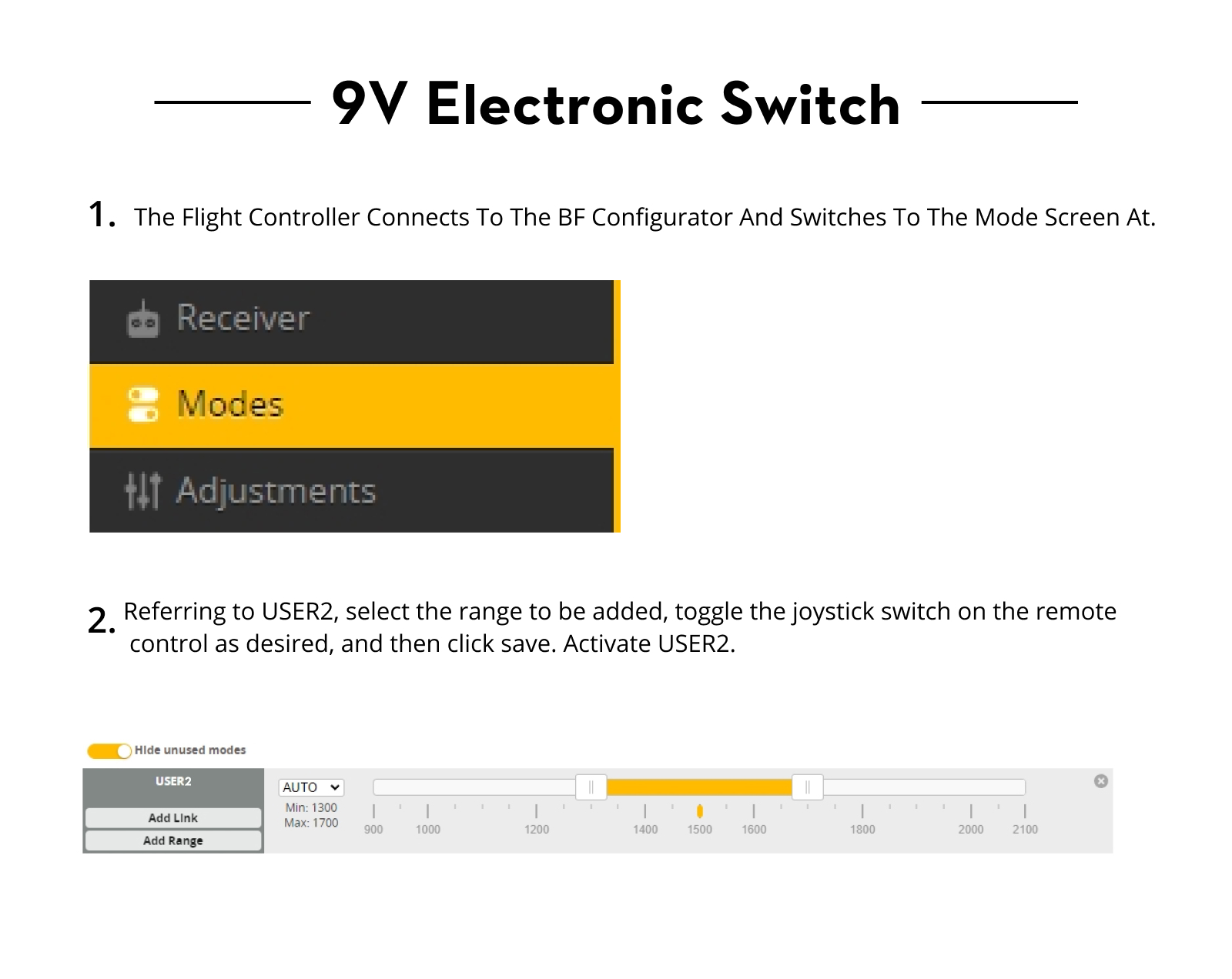
9V Electronic Switch:
By controlling the switch of USER2, it is possible to control all 9V power supply to the flight controller, temporarily shutting off the image transmission to avoid damage to the equipment due to prolonged high temperatures.
Connect the flight controller to the BF configurator and switch to the Modes interface.
Scroll down to find USER2, select "Add Range", then move the joystick switch on the remote controller you wish to configure. Afterward, save the motor settings. Activate USER2.

⚠️ 下單前請先聯繫酷飛 LINE 官方帳號確認是否有現貨,確認後再下單。
加入 LINE 官方帳號(LINE ID:@729jvyax)

【Flywoo】GOKU F405 HD V2 12A ELRS AIO 飛控電調|1–2S・O4 隨插即用

【Flywoo】GOKU F405 HD V2 12A ELRS AIO 飛控電調|1–2S・O4 隨插即用

【Flywoo】GOKU F405 HD V2 12A ELRS AIO 飛控電調|1–2S・O4 隨插即用

【Flywoo】GOKU F405 HD V2 12A ELRS AIO 飛控電調|1–2S・O4 隨插即用

【Flywoo】GOKU F405 HD V2 12A ELRS AIO 飛控電調|1–2S・O4 隨插即用

【Flywoo】GOKU F405 HD V2 12A ELRS AIO 飛控電調|1–2S・O4 隨插即用

【Flywoo】GOKU F405 HD V2 12A ELRS AIO 飛控電調|1–2S・O4 隨插即用

【Flywoo】GOKU F405 HD V2 12A ELRS AIO 飛控電調|1–2S・O4 隨插即用

【Flywoo】GOKU F405 HD V2 12A ELRS AIO 飛控電調|1–2S・O4 隨插即用

【Flywoo】GOKU F405 HD V2 12A ELRS AIO 飛控電調|1–2S・O4 隨插即用

【Flywoo】GOKU F405 HD V2 12A ELRS AIO 飛控電調|1–2S・O4 隨插即用

【Flywoo】GOKU F405 HD V2 12A ELRS AIO 飛控電調|1–2S・O4 隨插即用

【Flywoo】GOKU F405 HD V2 12A ELRS AIO 飛控電調|1–2S・O4 隨插即用

【Flywoo】GOKU F405 HD V2 12A ELRS AIO 飛控電調|1–2S・O4 隨插即用

查看酷飛官方商品頁

低利率分期與下單前確認

想降低一次付清的壓力,可選擇銀角低利率分期 6/12/18/24 期;實際申請資格、利率、總費用與核准結果以銀角平台審核及訂單顯示為準。

  • 下單前請先傳訊息至酷飛官方 LINE(ID:@729jvyax)確認有無現貨,確認後再下單,可避免預購或調貨等待時間過長。
  • 本賣場不提供免運服務,運費依配送方式另計。
  • 可使用 7-ELEVEN 或全家店到店;請透過官方 LINE 提供超商名稱、門市名稱、店號、收件人姓名與電話。
  • 如需黑貓宅急便,請先透過官方 LINE 確認配送方式與運費後再下單。

加入酷飛官方 LINE|@729jvyax

【Flywoo】GOKU F405 HD V2 12A ELRS AIO 飛控電調|1–2S・O4 隨插即用

這是 Flywoo 的飛控與電子零組件,商品名稱、型號與可確認規格如下。為避免把不同年份或不同版本的參數混用,本頁文字僅整理目前商品標題、選項與既有資料中可核對的資訊;詳細尺寸、接線及安裝示意請一併參閱下方原有說明。

商品重點

  • 商品識別:【Flywoo】GOKU F405 HD V2 12A ELRS AIO 飛控電調|1–2S・O4 隨插即用
  • 品牌:Flywoo
  • 商品類型:飛控/電子零件
  • 可選規格:Built-in ELRS 2.4g (MPU6000)/Built-in ELRS 2.4g (ICM42688)/NO RX(ICM42688)

選購與安裝確認

  • 確認輸入電壓、電流容量、安裝孔距、接頭與韌體目標。
  • 安裝及焊接前請斷電,完成後先檢查短路與極性。
  • 首次上電建議使用限流保護並先拆除槳葉。

包裝與出貨說明

本商品依您選擇的規格出貨;若商品名稱、選項或圖片標示數量,出貨內容以該規格為準。商品圖可能同時展示安裝效果或其他搭配零件,未列於所選規格者不包含。若無法確認版本,請在下單前提供實機型號或照片由我們協助核對。

既有詳細資訊與原廠資料

With the growing popularity of digital transmission, FLYWOO introduces an innovative solution for 1-2S HD Micro Drones.

This full-featured HD AIO solution integrates a Type-C interface, equipped with a high-performance F405 BGA MCU, and offers enoug Uart to meet the meet all you need. The GOKU F405 HD V2 AIO features a built-in 9V 2A BEC module, effectively preventing power cuts in the O3 Air unit due to insufficient voltage. 

Additionally, it comes with a serial ELRS 2.4G receiver, an 8MB black box, a barometer, and a current sensor, specifically designed for HD VTX. Its socket-style motor connections and plug-and-play O3 design significantly simpliy the installation and debugging process, achieving a perfect blend of efficiency and convenience.

Highlights:

  1. Type-C Design: Utilizes Type-C , more convenient and reliable connections.
  2. New Power Supply : Features 9V 2A BEC , effectively preventing power outages in the O3 Air unit due to voltage dropping .
  3. Plug-and-Play O3 Port: Direct plug design for O3 air unit eliminates complex soldering steps
  4. Motor Socket Design: Adopts socket connections for motors to facilitate quick replacements and upgrades.
  5. Multifunctional Design: Integrates a serial ELRS 2.4G receiver, 8MB black box, barometer, and current sensor, reserves 2 full UARTs and 1 standard SBUS port, supporting connections with various devices like GPS, HD VTX, and external receivers.
 
GOKU F405 HD 1-2S ELRS AIO V2
GOKU F405 1-2S 12A AIO ELRS
Firmware:
FLYWOOF405S_AIO
FLYWOOF405S_AIO
BEC:
5V 2A/9V 2A
5V 2A
Flash:
8M
8M
LED:
2*WS2812
2*WS2812
Barometer:
DPS310/SPL06
DPS310/SPL06
Gyro:
ICM42688P / MPU6000
ICM42688P / MPU6000
Motor:
M1-M4 OUTPUT I2C: SCL/SDA
Uarts:
1,2,3,4,5,6
1,2,3,4,5,6
connector:
Type-C
Micro
OSD:
NO
AT7456E
Hole:
25.5*25.5-3mm
25.5*25.5-3mm
Size:
30*30mm
30*30mm
Weight:
4.9g
4.1g

Specifications:

  • BF Flight Controller Firmware: FLYWOOF405S_AIO
  • INAV Firmware: FLYWOOF405HD
  • MCU: STM32F405BGA
  • BEC:  5V 2A/9V 2A 
  • Flash:  8M
  • LED: 2*WS2812
  • Barometer:  DPS310/SPL06
  • Gyro:  ICM42688P / MPU6000
  • Motor: M1-M4 OUTPUT I2C: SCL/SDA
  • Uarts: 1,2,3,4,5,6 
  • connector: Type-C 
  • OSD: NO
  • Hole:  25.5*25.5-3mm 
  • Size:  30*30mm 
  • Weight: 4.9g

Onboard 4in1 ESC

  • Built-in 1S/2S 12A BL_S 4in1 ESC
  • Support Oneshot125, Oneshot42, Multishot,
  • Dshot150, Dshot300, Dshot600
  • Input Voltage: 1-2S Lipo
  • Firmware: BLHELI_S
  • Firmware: Z_H_30_REV16.7

ELRS2.4G RX: (optional)

  • ESP8285 MCU
  • SX1280IMLTRT RF Module
  • Frequency Range: 2400 MHz to 2500 MHz
  • Maximum receive refresh rate: 500Hz
  • Minimum receiver refresh rate: 25Hz Seiral:
  • UART 1
  • Firmware: Flywoo EL24P 2400 RX
  • Version: 3.X.X

In the Box

  • 1x XT30 Power Cable
  • 1x Flywoo ELRS 2.4g Minimortal PCB T Antenna UFL(only ELRS Version)
  • 1x DJI O3 Connection Cable
  • 1x PH 2.0 Battery Lead
  • 1x capacitor 
  • 4x JST Straight Socket
  • 4x M2*10 screw
  • 4x M2 nuts
  • 4x M2 shock-absorbing ball

About Betaflight

ESC Firmware

  1. The ESC firmware defaults to Bluejay 0.19.2 48KHz.
  2. supports bidirectional D-shot and RPM filtering in Betaflight
  3. it doesn’t recommend upgrading the 96KHz, or it might cause an error in the motor idle setting, not spinning when disarmed.
  4. DO NOT flash the firmware with a shorter interval, otherwise, there will be a certain chance of stalling and burning the flight controller.
 

Serial ELRS 2.4G RX

  1. receiver protocol Serial ELRS 2.4G RX uses the Crossfire serial protocol (CRSF protocol) to communicate between the receiver and the flight controller board. So the Serial ELRS 2.4G RX is available to support upgrading to ELRS Configurator with no need to flash Betaflight flight controller firmware.
  2. Binding steps     
  • To enter the binding mode, unplug and plug the power/data cable three times;
  • The RX LED will flash rapidly twice, indicating the receiver is in binding mode;
  • Ensure the TX module or wireless transmitter enters binding mode;
  • If the receiver's light stays on constantly, it means it's bound.

      3.Upgrade steps

  • The Serial ELRS 2.4G RX can be updated via Wi-Fi or Betaflight serial passthrough. Here is the way to update the Serial ELRS 2.4G RX firmware through passthrough.
  • Insert the FC into the computer, but do not connect to the Betaflight configurator.
  • Select the target "FLYWOO 2.4Ghz EL24P"
  • Use the BetaflightPassthrough option in the ExpressLRS configurator for the upgrade
9V Electronic Switch:
By controlling the switch of USER2, it is possible to control all 9V power supply to the flight controller, temporarily shutting off the image transmission to avoid damage to the equipment due to prolonged high temperatures.
Connect the flight controller to the BF configurator and switch to the Modes interface.
Scroll down to find USER2, select "Add Range", then move the joystick switch on the remote controller you wish to configure. Afterward, save the motor settings. Activate USER2.

⚠️ 下單前請先聯繫酷飛 LINE 官方帳號確認是否有現貨,確認後再下單。
加入 LINE 官方帳號(LINE ID:@729jvyax)

【Flywoo】GOKU F405 HD V2 12A ELRS AIO 飛控電調|1–2S・O4 隨插即用

【Flywoo】GOKU F405 HD V2 12A ELRS AIO 飛控電調|1–2S・O4 隨插即用

【Flywoo】GOKU F405 HD V2 12A ELRS AIO 飛控電調|1–2S・O4 隨插即用

【Flywoo】GOKU F405 HD V2 12A ELRS AIO 飛控電調|1–2S・O4 隨插即用

【Flywoo】GOKU F405 HD V2 12A ELRS AIO 飛控電調|1–2S・O4 隨插即用

【Flywoo】GOKU F405 HD V2 12A ELRS AIO 飛控電調|1–2S・O4 隨插即用

【Flywoo】GOKU F405 HD V2 12A ELRS AIO 飛控電調|1–2S・O4 隨插即用

【Flywoo】GOKU F405 HD V2 12A ELRS AIO 飛控電調|1–2S・O4 隨插即用

【Flywoo】GOKU F405 HD V2 12A ELRS AIO 飛控電調|1–2S・O4 隨插即用

【Flywoo】GOKU F405 HD V2 12A ELRS AIO 飛控電調|1–2S・O4 隨插即用

【Flywoo】GOKU F405 HD V2 12A ELRS AIO 飛控電調|1–2S・O4 隨插即用

【Flywoo】GOKU F405 HD V2 12A ELRS AIO 飛控電調|1–2S・O4 隨插即用

【Flywoo】GOKU F405 HD V2 12A ELRS AIO 飛控電調|1–2S・O4 隨插即用

【Flywoo】GOKU F405 HD V2 12A ELRS AIO 飛控電調|1–2S・O4 隨插即用

查看酷飛官方商品頁

賣家資訊 & 活動期間

名稱:酷飛多軸聯盟
地址: 新北市永和區永和路二段334號
電話: 0925227788

配送及其他費用說明

配送

****來店自取另有優惠****

-7eleven/全家免運優惠!! 宅配需自行支付運費!! 

-如遇尺寸or重量超過便利商店寄件,皆以自取或黑貓寄件(自付)

-來店自取優惠僅部分品項適用(請電話詢問)

其他費用

歡迎來到酷飛多軸聯盟!

我們是無人機愛好者的天堂,也是專業飛手的最佳夥伴。作為多家頂尖無人機品牌的授權經銷商,酷飛多軸聯盟致力於提供優質的無人機產品與服務。無論您是初學者、專業攝影師,或農業、漁業等領域的專業人士,我們都能滿足您的需求。

豐富的品牌與產品選擇

我們提供多樣化的無人機產品,涵蓋不同應用場景:

  • DJI授權經銷:從入門級到專業級無人機,滿足航拍、農業等多種需求。
  • SwellPro防水無人機:專為海釣和水上活動設計,無懼風浪。
  • FPV穿越機:HDZero和Walksnail品牌,帶來極速競速體驗。
  • 台灣自製品牌:亞拓和新樂飛,提供專業海釣機、農業機及考證照專用機,助您輕鬆通過認證,合法飛行。

專業認證服務與技術支持

我們不僅銷售無人機,更提供全方位支持:

  • 認證培訓:專業指導與課程,助您順利考取亞拓或新樂飛無人機駕照。
  • 技術支持:專業團隊隨時解答飛行中的疑難,確保無憂飛行。

實體店面,購物更安心

與線上商店不同,我們的實體店面讓您親自體驗:

  • 試飛體驗:現場試飛,放心購買。
  • 便利交通:店面附近有停車場,步行五分鐘即可抵達。
  • 熱情服務:專業店員提供選購建議與技術諮詢。

一站式購物,應有盡有

我們提供完整的無人機生態系統:

  • 攝影器材:DJI相機、電池、遙控器、槳葉等配件一應俱全。
  • 專業裝備:適用於航拍、農業噴灑等多種場景。

立即造訪,開啟飛行之旅!

酷飛多軸聯盟誠邀您親臨實體店面,探索無人機的無限可能。無論您是追求極致飛行的玩家,或尋求專業工具的企業用戶,這裡都是您的最佳選擇。快來選購夢想無人機,一起飛向更遠的天空!

購買流程

STEP.1

選好商品按下【立即購買】

STEP.2

zingala會員 → 掃碼

非會員 → 填單

會員請打開zingala銀角零卡掃描付款條碼 / 非會員則線上填寫申請資料並送出

STEP.3

分期資格審核中

若頁面提示審核中則請您留意手機來電,專員會致電與您核對資料
(審核標準為機密,恕不提供查詢原因)

STEP.4

審核通過後,商家會與您聯繫

若審核通過,商家會聯繫您再次確認款式、顏色、配送地址等資訊,並進行商品配送或面交。※最終訂單成立與否須由商家通知,審核通過不代表訂單一定成立

篩選
排序
顯示數量